
Phishing Scams – Don’t Take The Bait
Originally published June 9, 2016 — retained for educational reference.
What is Phishing?
(fish´ing) (n.): The act of sending an email to a user falsely claiming to be an established legitimate enterprise in an attempt to scam the user into surrendering private information that will be used for identity theft.
Phishing is designed to trick you into giving out your personal details so the attacker can steal your identity and/or your money.
Phishing attempts are most commonly made via:
- Emails pretending to be from reputable companies
- Phone calls (for example, fake “Microsoft” calls)
- Websites with pop‑ups, fake alerts, or “you’ve won” messages
Phishing differs from spam: spam is annoying and unsolicited; phishing is targeted and leads to real theft and real losses.

Why Phish?
Because phishing works.
- It tempts users with offers, freebies and giveaways.
- Humans are curious and still get lured in, even when we “know better”.
- It’s extremely profitable and low effort—if only 1% fall for it, the attacker still wins.
A global study by the Anti‑Phishing Working Group (APWG) in May 2016 revealed:
- Retail/Service was the most targeted sector (42.71% of attacks).
- 406–431 brands were targeted each month.
Commonly abused brands include PayPal, Apple, Facebook, and in Australia: ATO, AGL, Australia Post, etc. Fake websites are increasingly using HTTPS and certificates to appear legitimate.
How Can I Tell If I Am Being Phished?
Phishing emails almost always contain some of the following:
- Typos and grammatical errors
Cyber criminals are notorious for poor spelling and grammar. - Web links or attachments
Links redirect to malicious sites that install malware. Attachments (often ZIPs or macro files) execute malware when opened. - Threats
Warnings about account closure, fines, or “security at risk” to make you react quickly. - Spoofing
Using popular company names, email addresses or internal‑looking addresses (e.g. your boss, scanner, fax) to appear legitimate. - Phone calls
Callers claiming to be from “Windows”, “Telecom”, “Telstra”, “Microsoft”, “PayPal”, etc., asking for credentials, payment details, or remote access to your PC.
How To Avoid Being Phished
Most of this comes down to pausing for a few seconds and inspecting.
- Is the email from someone you know or expect?
If not, treat it as suspicious—especially if it claims to be a bill, notice, or urgent message. - Are the links real?
Hover (don’t click) over links to see the true destination. - What is in the attachment?
Be wary of ZIPs, macros, or oddly named files, especially if they include your name or generic labels like “scan” or “attachment”. - Assess the threat.
If an email claims your account will be suspended unless you click a link, call the company using a known number instead. - Is it a spoof email?
Ask yourself:
– Does that scanner/fax actually exist on your network?
– Would your CEO really send that kind of email?
– Would your boss pitch you a “pesos making journey”? - Personal use of work email addresses
Don’t sign up to personal sites with your work email. It increases the risk of business compromise via personal phishing. - Phone calls can be returned
Legitimate companies like Microsoft, PayPal or Telstra will not call to ask for passwords or card details.
If unsure, ask for an employee ID and a callback number, then hang up and call the official number yourself.
Just take a few moments to check. Those few moments could save you a whole load of hassle, not to mention money.
Example phishing emails
Bank “scan” email
- Is that really your bank’s email address?
- Why is the “message” a ZIP file called “scan”?
- Why no proper signature or professional tone?

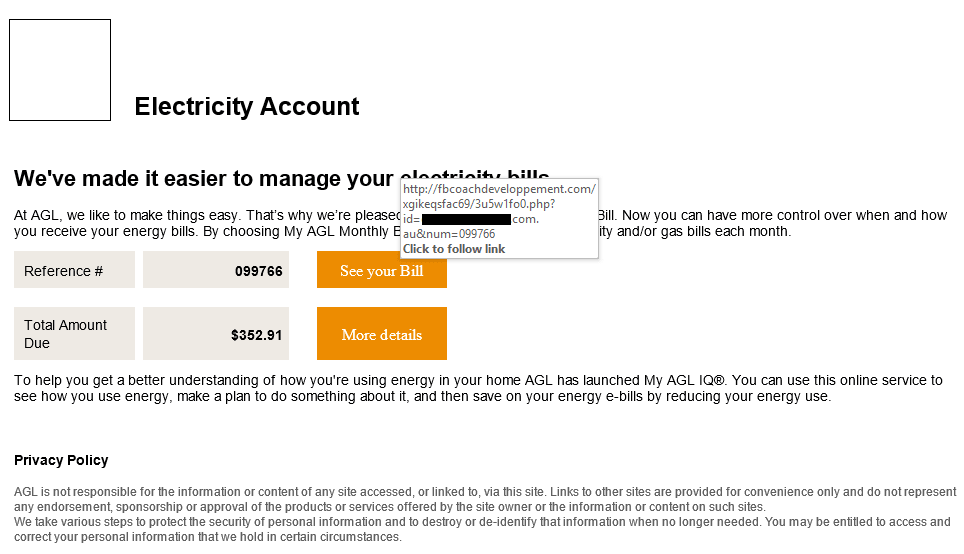
AGL phishing email
- Missing AGL logo.
- You don’t receive your bill via email.
- Hovering over the link shows it goes to a completely unrelated site.
- The link actually deploys ransomware once clicked.
Similar scams appear as Australia Post or ATO emails. Combined, they’ve claimed thousands of victims.
Don’t become complacent
While poor spelling, bad grammar and dodgy links are common signs, sophisticated phishers:
- Use professional copy
- Include real logos and branding
- Copy legitimate layouts and content
No legitimate organisation will urgently request credit card details via email.
If in doubt:
- Pick up the phone and call the company using a known number
- Manually type the website address into your browser
It is far better to delete an email and have it resent, or hang up on a suspicious caller, than to be phished and robbed.
Keep your antivirus up to date.
Keep your firewalls updated and secure.
Above all, don’t rush. Read what is before you and take a breath before clicking a link or opening an attachment.

F5 Solutions has been delivering refreshing
IT services and support for small-to-medium sized businesses since 2011, throughout Richmond,
Windsor, The Hawkesbury, and Greater Sydney as
well as Bathurst, Lithgow, Oberon, and Orange.
Our collective experience and industry service
began as early as 1999.
More Information
Bathurst
Blue Mountains
Central West
Hawkesbury
Lithgow
Oberon
Orange
Penrith
Western Sydney
Contact Info
Blue Mtns | Hawkesbury | Sydney West
PH: 02 4572 2206
Bathurst | Lithgow | Oberon | Orange
PH: 02 6308 9669
Email: hello@f5solutions.com.au
Office Hours: Mon-Fri, 8AM-6PM
(Weekends / After Hours by Appointment)
© 2026 F5 Solutions Pty. Limited ABN 89 153 991 765